Product Sheet · v1.10.3

Kadosh Bot Enterprise

Your automated trading desk — audited, guarded, and honest about the numbers

Nine automated trading bots inside the Kadosh Command Center desktop app, trading Nasdaq and Micro Gold futures on your Topstep account. Practice, Evaluation, and Funded accounts all supported — you choose your size and risk, the app shows you exactly what that choice means in dollars, and a guard stack watches every order. Every published number carries its measurement window.

9
Trading Bots
3
Account Types
$924
Audited Year /mo (150K gold)
10,000
MC Runs Behind Stats
v1.10.3
Current Release
The Strategy, Without the Secrets

Validated, then shipped — in that order

The flagship strategy trades Nasdaq and Micro Gold with broker-side protective brackets on every position. Its recipe ships encrypted and is never published — what IS published is the audit: a full measured year, honest two-side costs, and a 10,000-run Monte Carlo behind every statistic on this site. Numbers without a measurement window are marketing; ours have windows.

Nine bots, one account

Enterprise Bot (the validated NQ / Micro Gold flagship), Playbook Bot (Nasdaq sweeps plus a braked gold card), NY AM Bot (the 9:30 ET open, on MNQ micros by default), Asia Reversal Bot (the Tokyo evening), London Gold Bot — LG-2 (the London opening-range breakout on Micro Gold, new 2026-09-13), the original London Gold engine (still selectable), the Wolfpack (five champion session legs on MNQ micros, real orders once you switch them on and acknowledge them), and - since October 2026 - the Asia AM Bot (an early-morning candle fade) and the Moore IB Bot (an opening-range retrace), which run only inside the Heaven on Earth presets that were graded with them. Since v1.9.66 the NQ bots each pick NQ or MNQ micros and carry their own size, and since v1.9.67 every routed order lands on that chosen contract. Enable any mix — they share one account, one loss budget, and one guard stack, a one-position-per-market lock keeps them out of each other's lane, and the app tells you plainly what stacking them means.

New in v1.10.1 – v1.10.3 (October 2026) — Heaven on Earth presets. Five one-click presets for a 50K account, each graded May 27 – Sep 25, 2026 over stored bars with the shipped engines (not live fills): Green-day lock (Asia, NY AM and the Wolfpack taking turns by the hour), Steady 80% and Steady 87% (the new Asia AM bot with NY AM), Aggressive 65% and Aggressive+ (the new Moore IB bot with NY AM, plus Asia or Asia AM). One confirm sets every card exactly as graded and switches on My Size, the shared-account box and, where the preset runs it, the Wolfpack's real orders; an account-wide day rule can end the day early. The Asia AM and Moore IB bots run only inside their presets, and neither has traded live yet — the app says so before you confirm, and live results will not match the graded calendar trade for trade. Changing a card by hand never locks you out: the preset switches itself off and says so, and a Preset off button leaves one on purpose (v1.10.2). Also since September: updates are signed by Kadosh and unsigned updates are refused (v1.9.90); the strategy files open only for an active licence our server has confirmed, and the first Start asks you to read and agree to the Terms, Privacy Policy and Risk Disclosure — one tick, once (v1.10.1). The graded numbers for every preset are on the Stats page.

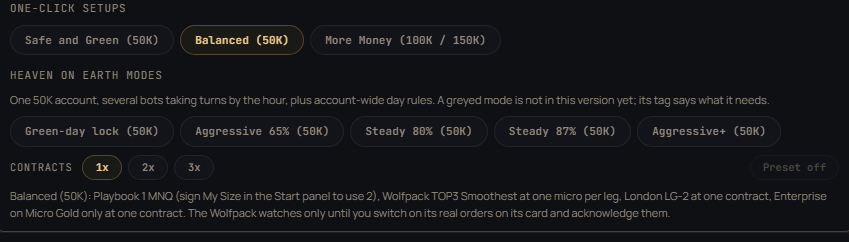
v1.9.70 — one-click setups. Three chips at the top of the Bots panel set four cards at once: the Playbook on MNQ micros, the Wolfpack at one micro per leg, London LG-2 at one contract and the Enterprise Bot on Micro Gold only at one contract. The three stacks were measured together over the same 64 sessions (Jun 16 – Sep 11, 2026; research ledgers at one unit each, not live fills): Safe and Green (50K) $9,253, 70% green sessions, deepest dip $614 · Balanced (50K) $13,936, 73% green sessions, deepest dip $1,348 · More Money (100K / 150K) $16,755, 70% green sessions, deepest dip $1,378. The bots do not lose on the same days, which is why the stack is green more often than any one bot. A chip never touches an acknowledgment: the Wolfpack’s real-order switch and My Size stay yours.

v1.9.83 – v1.9.84 (September 21, 2026). NY AM and Asia now arm on their exact start second instead of waiting up to 20 seconds for the next heartbeat. If Topstep refuses an entry because price already moved past it, the bot now enters at market — the way the backtest fills that trade — instead of losing the day; a Playbook stop refused the same way is moved to the real stop from your fill, and the trade is closed only if that is passed too. If a close fails at the end of a session, the trade keeps a stop and the bot retries every cycle, and its card says so. The loss guard ignores old prices, so frozen data can no longer fake a lockout or hide a loss. The Topstep login renews itself. Funded (XFA) accounts are read correctly, a wrong PC clock or a lost licence-server link is explained in plain words, and an update cut off by a power loss asks you to reinstall instead of being treated as tampering. New installs start NY AM, Asia and the Playbook on MNQ micros (a saved NQ stays NQ), and the Enterprise Nasdaq leg defaults to Auto, which picks the tuning measured for your contract size.

Markets & Trade Size — One Simple Panel
NQ (Nasdaq 100)
Index leg — full-size or micros (MNQ, 1/10 size)
Account typesPractice / Eval / Funded
Protective stop + targetOn the broker, every trade
Micros switchOne toggle
MGC (Micro Gold)
The audited flagship program
Account typesPractice / Eval / Funded
Audited windowFull year, published
Already a microYes

Pick a measured preset — or pick My Size

The Trade Size panel shows measured presets (1, 2, or 3 contracts with their audited monthly estimate, pass odds, and account-blow risk) — or choose My Size and set your own contracts and risk mode. Your choice runs, on any account type, after one plain-English acknowledgment that spells out the dollars. Your size applies to each market separately: 3 contracts with both markets on means 3 × NQ and 3 × MGC. The only trade the bot will ever refuse at any setting is one whose stop loss alone would end your account.

The Guard Stack — On Every Order, Every Account Type
Broker-Side Brackets — stop + target live on the broker, so protection survives crashes and outages
Account-Survival Refusal — a trade whose stop alone would breach your Max Loss is refused, at any setting
Daily Loss Lockout — trading stops for the day at your limit; widening it only takes effect tomorrow
Stop-Risk Reservation — every open position's stop risk is counted before a new trade is admitted
Price-Limit Rule — Topstep's 2% price-limit conduct rule enforced on prop accounts, fails closed
News Blackout — entries blocked around high-impact events; a stale calendar shows a loud banner, never a silent stop
3 PM Entry Cutoff — no new trades in the statistically worst hour (a session bot inside its own session is exempt)
3:55 PM Auto-Flatten — the day bots are never held into the close; each session bot is flat by the end of its own session
Regime Kill-Switch — if recent sessions lose more than the strategy ever lost while healthy, it stops itself
Self-Healing Bridge — auto-reconnects and auto-restarts; a dead engine never silently stays dead
Update-While-Flat Gate — updates refuse to install while the bot is running or a position is open
Signed Integrity Manifest — the app verifies its own code signature before it will trade
Accounts It Trades Today
AccountSizeMax Loss LimitStatus
Topstep Practiceanyyour custom lockoutFully supported
Topstep Evaluation / Combine$50K / $100K / $150K$2,000 / $3,000 / $4,500Fully supported
Topstep Funded (Express)$50K / $100K / $150K$2,000 / $3,000 / $4,500Fully supported
Lucid (Rithmic)——Not supported yet (Topstep only today)

Same bot, same trades, same guards on every supported account type — your chosen size runs everywhere it can survive the firm's Max Loss rule. The app connects to Topstep (TopstepX) today.

Kadosh Command Center — The App

A Windows desktop app that installs in minutes, activates with your Discord purchase, and updates itself. No servers to rent, no code to touch.

Command ViewStart / stop, live account, guard, and feed state at a glance
Trade Size PanelMeasured presets with real pass/blow odds, or My Size with a plain-dollar acknowledgment
Bot BrainWhat the bot is thinking right now, and the exact reason for its last rejection
Setup WizardGuided 3-minute first run: connect Topstep, pick your account, choose your risk with real statistics
Loud Banners, No Silent StatesStale news feed, consistency pressure, lockouts — every state shows itself in plain words
Activity LogEvery event the bridge emits, live, with guard telemetry
Auto-UpdateSafety releases are mandatory — old copies pause trading until they update, so the whole fleet runs the protected build
Verified Session ReportsSame build on independent machines has matched results to the cent — reproducibility we publish
Under the Hood
Trading EnginePython bridge, fully audited test gate (6,500+ Python tests, 117 app suites and 40 licence-server suites) on every release
Desktop AppElectron — Command Center UI, guided setup, live telemetry
Broker ConnectionTopstepX API — REST + realtime WebSocket, direct to your Topstep account
Strategy ProtectionStrategy parameters ship encrypted; the recipe never leaves the vault
LicensingDiscord-verified activation, machine-bound license, revocation-safe
Release IntegritySigned integrity manifest; the app refuses to trade tampered code
Update PipelineTen-step gated releases: build, test, verify artifact, sign the manifest with the release key, verify feed, then raise the floor; the app verifies that signature before it installs anything
How You Set It Up — The Actual Screens (v1.10.3, captured 2026-10-05)

Step 1 — Pick a one-click setup, or your own mix

The Bots panel opens with two rows of one-click choices. The Heaven on Earth row holds the five graded presets — pick one and confirm, and every card is set exactly as graded, with the contracts toggle (1x, 2x, 3x) and a Preset off button beside it. Under it, three one-click setup chips — Safe and Green, Balanced, More Money — set four cards at once, each measured over the same 64 sessions. Or switch bots on one by one: the counter shows how many are live, and if you stack more than one, the app spells out the combined worst-case in dollars before you acknowledge it. The day buttons under each bot pick its trading days; leave them alone and the audited defaults run. A one-position-per-market lock referees the bots automatically — two engines can never fight over the same market. Since v1.9.12 the flagship and Playbook each get their own NQ / Gold market switches, so you can run any combination — Nasdaq-only, gold-only, or both per engine — and Playbook gets its own contract-size field, capped to your account’s limits automatically. An Overlap option (two engines sharing one market) is visible in the app but held until it passes the money-path audit — we don’t ship what we haven’t proven.

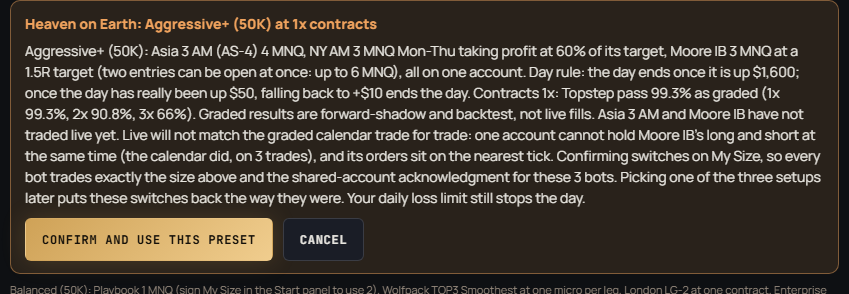
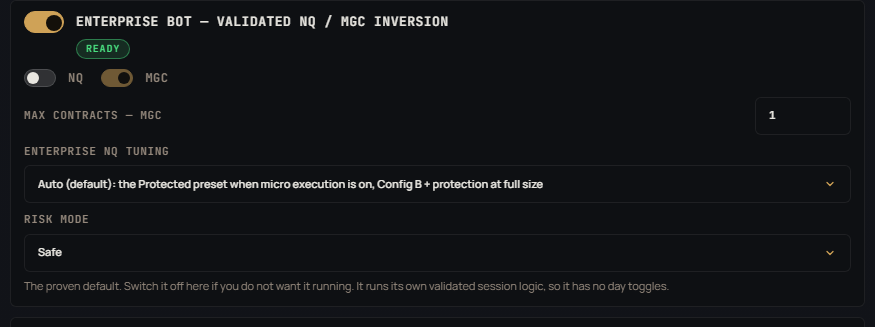
The Heaven on Earth row at the top of the Bots panel: five graded preset chips, the contracts toggle and the Preset off button The Confirm box for the Aggressive+ preset: every bot and size as graded, the day rule in words, the graded pass rate, and the warning that Asia AM and Moore IB have not traded live yet One-click setups under the presets: Safe and Green, Balanced, More Money, with the line that says which setup the cards are The Enterprise Bot card: NQ and Micro Gold market switches, its own contract count, the NQ tuning presets and the risk mode

Step 2 — Every bot has its own card: instrument, size, presets, days

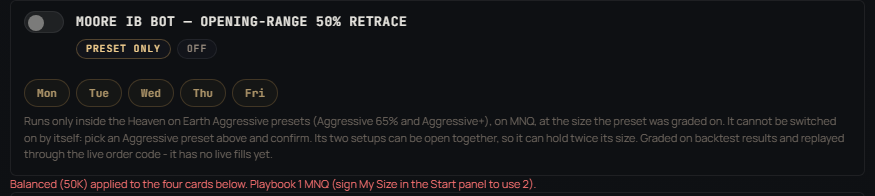
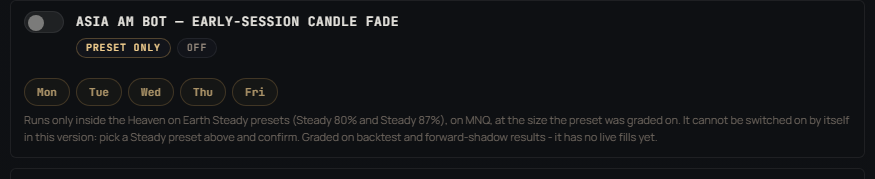
Since September each bot carries its own settings on its card. The Playbook picks NQ or MNQ micros and its own count; the Wolfpack picks one of six audited presets and has its own real-order switch; London LG-2 has its own contract count. The two preset-only bots (Asia AM, Moore IB) show a Preset only badge: their switch cannot be turned on by hand, and their card says plainly that they have no live fills yet. Each card prices your choice in plain dollars, and sizes above the validated count run only after the My Size acknowledgment in the Start panel — the guards and the account cap still apply to whatever you type.
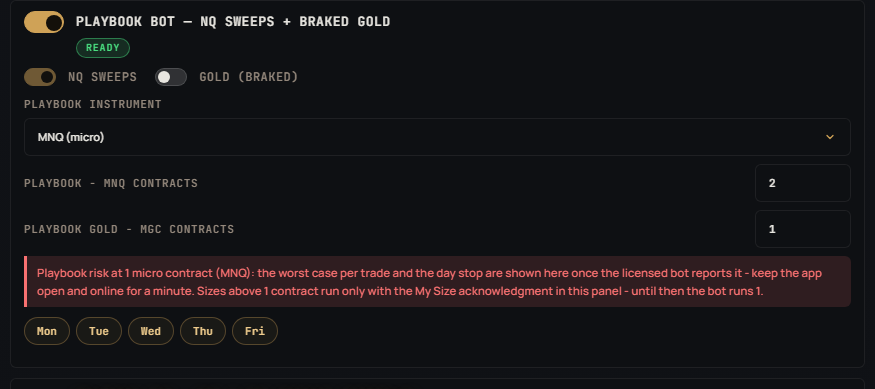
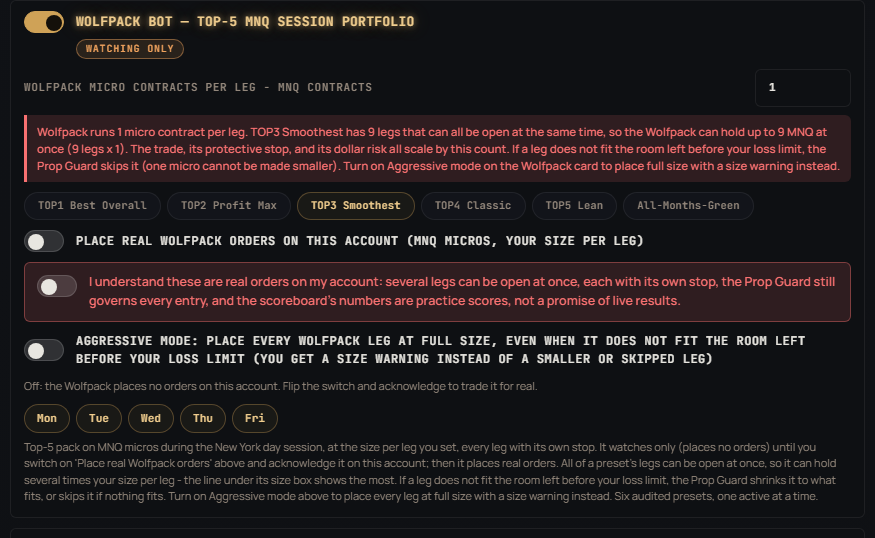
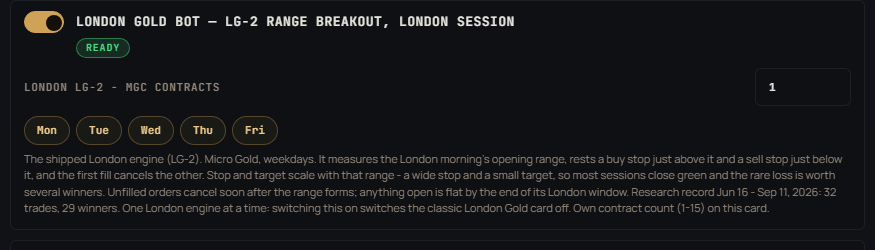
The Playbook Bot card with its NQ-or-MNQ instrument choice, its own contract count and market switches The Wolfpack Bot card with its six preset chips, micro count per leg and the real-order switch The London Gold Bot LG-2 card with its own contract count and trading days The Moore IB Bot card: preset only, off until an Aggressive preset is confirmed, with the words that say it has no live fills yet The Asia AM Bot card: preset only, off until a Steady or Aggressive+ preset is confirmed, with the words that say it has no live fills yet

Step 3 — Press Start; the plan tells you exactly what will trade

The Start panel lists every bot with what it will do — contract, count, live or watching — and the acknowledgments that apply. One button. The app saves your settings, runs its safety checks, and the bots begin their sessions. Every trade goes in with its protective stop and target resting at the broker — so your protection lives even if your computer doesn’t. Press Stop any time; the day bots go home flat by 3:55 PM ET regardless, and each session bot is flat by the end of its own session.
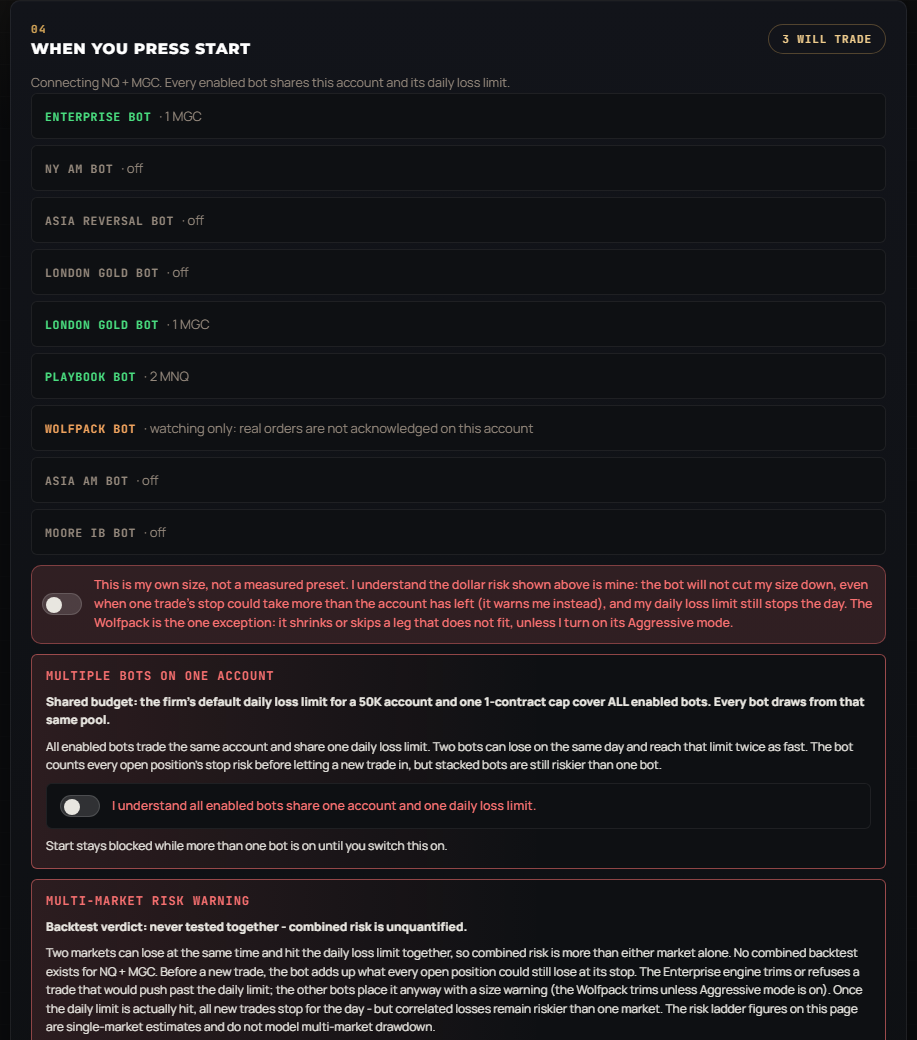
The Start panel: one line per bot saying what will trade, the shared-budget acknowledgment and the My Size acknowledgment

Screens captured 2026-10-05 from the v1.10.3 build in a test profile (no account connected), with the Balanced setup applied.

Why Kadosh Bot Enterprise
1
Honest, Audited NumbersA full measured year and a 10,000-run Monte Carlo behind every stat — each with its window published. We show the losing scenarios too.
2
Your Size, Your CallMeasured presets or My Size — you choose, the app spells out the dollars, and your choice runs on Practice, Eval, and Funded alike.
3
Risk Is Always DefinedStop and target rest on the broker for every position — protection survives crashes, disconnects, and reboots.
4
Built for Prop RulesFirm loss limits, the 2% price-limit rule, stop-risk reservation, and daily lockouts are enforced in code, not left to willpower.
5
Proven ReproducibleIndependent machines running the same build have matched trades to the cent — documented in published Verified Session reports.
6
Runs UnattendedSelf-healing bridge, auto-restart, auto-flatten at 3:55 PM for the day bots and at the end of each session bot's own session — it goes home flat every day without you watching.
7
Nine Bots, One PriceThe validated flagship, the Playbook engine, four session bots (NY AM, Asia, London LG-2 and the original London engine), the Wolfpack, and the two preset-only engines (Asia AM and Moore IB) — all in the same app, all behind the same guard stack.
9
One-Click Setups That Were Measured TogetherBalanced (50K): $13,936 over 64 sessions with 73% green sessions. Safe and Green: 70% green with a $614 deepest dip. More Money (100K / 150K): $16,755. Research ledgers, one unit each — and the four bots do not lose on the same days.
10
Win Rates You Can CheckEnterprise Nasdaq leg, Protected preset: 98.1% win rate and 96.3% green days over 63 days on micros. Playbook gold card 78% over 37 sessions. London LG-2 29 winners of 32 trades (90.6%). Enterprise gold 78.9% at a profit factor of 2.3. Wolfpack: 80.3% of legs won on real evaluation and funded accounts (Sep 8–21, live fills), and all six presets are green over 127 scoreboard sessions. Every figure with its window on the Stats page.
11
Micros, Your Instrument, Your SizeNY AM, Asia and the Playbook each pick NQ or MNQ micros and carry their own count; every routed order lands on the contract you chose. A micro is a tenth of the swing with the same edge — which is how a 50K account runs three bots at once.
12
Real Orders, Your SwitchThe Wolfpack places real MNQ orders only after you flip its switch and acknowledge it on your account; London LG-2 went live 2026-09-14 after its router reproduced all 32 research trades to the cent.
8
A Fleet That Stays CurrentMandatory safety updates mean every customer runs the newest protections — nobody trades on a forgotten build. Every update is signed by Kadosh; the app refuses one that is not.
Interactive Calculator
Scale to $10K+ Monthly

Real prop firm rules, real account limits — and honest audited economics. Re-baselined 2026-08-10: monthly figures come from the audited year and its 10,000-run Monte Carlo; pass odds come from a 10,000-path eval simulation through real firm rules. Estimates, not promises — roughly 1 year in 7 loses money even when the bot performs as designed.

Prop Firm Rules (re-checked 2026-09-14 against Topstep’s and Lucid’s help centers)
TopStep
Up to 5 active Express Funded Accounts (any size mix); Live Funded per Topstep’s live rules
Payout split90/10 (new traders Jan 2026+)
50K: target / max loss / max size$3K / $2K / 5 contracts (50 micros)
150K: target / max loss / max size$9K / $4.5K / 15 contracts (150 micros)
Payout requirement5 winning days of $150+ (or the 3-day consistency path)
Max per payout request50% of balance, capped $2K / $3K / $5K by size (50K / 100K / 150K)
Payout frequencyAfter each completed cycle, any market day (min $125)
After payoutMax loss resets to $0
Lucid Trading (LucidFlex)
LucidFlex simulated funded accounts; up to 5 payouts each, then moved live
Payout split90/10
50K: max loss / max size$2K / 4 mini or 40 micros
150K: max loss / max size$4.5K / 10 mini or 100 micros
Daily loss limitOptional (your choice at purchase)
Funded consistency ruleNone (Flex)
Payout requirement / max (50K, 150K)5 profitable days of $150 / $250; 50% of profit up to $2,000 / $3,000
Path to live5 payouts → moved to a live account; no payout buffer, no fixed window
Build Your Stack — every bot, its config, its instrument, its size
Mirror to1account(s)
Switch a bot on or off, pick its config where it ships more than one, pick full size or micros where it trades Nasdaq, set the count. Every result recomputes from the day-by-day research ledgers of the shipped engines over the same 64 sessions (Jun 16 – Sep 11, 2026), one unit each, commissions charged, not live fills. Each card’s footer shows that bot’s own measured line at one unit. The Asia AM and Moore IB bots are not in this lab: they run only inside the Heaven on Earth presets, whose graded results are on the Stats page.
shipped
MGC (micro gold)1contracts
shipped
1units · shipped card
same trades as Enterprise gold
MGC1contracts · one gold bot per account
shipped
MGC1contracts
real orders on your switch
MNQ, 1 micro per leg (the app places one per leg; several legs can be open at once)
shipped since v1.9.61 · forward ledger
1units
shipped since v1.9.62 · forward ledger
1units
Enterprise Bot · Nasdaq leg · Protected presetown window
+$5,408 · 98.1% win rate · 96.3% green days over 63 days (Jul 9 – Sep 10, 2026) at 5 MNQ micros on a 150K; 53 trades, $1,120 dip, still +$2,238 at four-tick fills. Measured on its own window, so it is shown here and not added into the stack math.
Equity of this stack, session by session — with the Topstep line and the payouts it would have earned
Equity Topstep line Payout
Payouts on this stack — Topstep Express Funded, standard path
How to read it: "green sessions" are sessions that ended positive; "deepest dip" is the largest fall from a high point on closed sessions; the Topstep line is the trailing Maximum Loss Limit walked forward day by day from a fresh account under Topstep’s published rule (it locks at the starting balance); "first payout eligibility" counts sessions until five sessions of $150+ have accumulated (Topstep’s standard path), measured from every possible start day in the window. Full-size NQ figures for the Playbook come from the 61-session study at one-tick fills; its micro figures from a separate measured MNQ run. NY AM and Asia use the forward shadow ledger of their shipped geometry (graded over stored bars since May 27, not accumulated live — see the note on selection below; every NY AM and Asia figure here is the ledger’s slippage-and-latency column on the geometry that actually ships. Both bots changed settings on 2026-09-11, in v1.9.61 and v1.9.62; this page previously described the settings they replaced, and showed NY AM as a flat bar-resolution average rather than its real sessions. The settings themselves stay sealed in the product and are not published. Micros are their own measured series, not a division by ten, because commission does not shrink with contract size. Two figures are quoted for each of these bots and both are measured: the lab window is the 51 sessions every bot on this page shares, while the full record graded since May 27 is 63 sessions for NY AM ($22,980 at one full-size contract, 73.0% of sessions green) and 78 for Asia ($26,765, 70.5% green). Graded at bar resolution without the latency model the same sessions read $29,447 and $29,334 — that higher pair is a ceiling, not a forecast, and the difference is what reaction time and slippage actually cost. Every number published here is the lower, latency-measured one. Two things about that record a reader should have. Most of it is graded backwards over stored bars rather than accumulated day by day: the grading pipeline dates from 7 September, so 58 of NY AM’s 63 sessions and 73 of Asia’s 78 were scored retrospectively. The settings were fitted on separate research data, so the ledger does test them out of sample — but the decision to ship these two out of nine candidates was taken on 11 September with this whole record visible, and the ledger has kept grading every session since. Over the last 30 days NY AM won 12 of 16 trades (75%, +$739.81 per micro, profit factor 2.28, Aug 24 – Sep 17) and Asia made +$186.23 per micro (+$2,111.50 per NQ, Aug 23 – Sep 20). That is still a short record, and it is stated here because a record the chooser could already see is not a test of the choosing. The lab grid is also weekday-only, so Asia’s twelve Sunday-evening sessions in this window sit outside its lab figure and are worth $1,301 — the full record beside it includes them). Mirrored accounts take the same trades on the same days, so totals multiply and so do the swings.
Build Your Fleet — the audited flagship unit, mirrored

Configure accounts

TopStep allows max 5 funded total (any mix). Lucid is not supported yet — the app connects to Topstep only — so the Lucid rows stay locked.
TopStep 50K2
TopStep 150K1
Lucid Flex 50K (not supported yet)0
Lucid Flex 150K (not supported yet)0
Your Scaling Timeline
12-Month Projection
Monthly payouts + cumulative
Monthly Cumulative
Month-by-Month Breakdown
Per-Account Economics
Already Have Funded Accounts?

If you already passed evals, you skip the waiting period. Here's your timeline from your current starting point:

You haveNext stepFirst payoutPath to $10K/mo
1 funded5 winning days → request payout2-4 weeksAdd 5-7 more evals (2-3 months)
3 fundedStart payout cycle on each1-2 weeksAdd 3-5 more evals (1-2 months)
5 funded (1 firm)Max at this firm, add 2nd firmThis cycleAdd 3-5 Lucid accounts (1 month)
5 TS + 5 LucidAll funded, payouts runningNowYou're there — $10K+/mo
Risk Disclaimer

Trading futures involves substantial risk of loss and is not suitable for all investors. Past performance, whether actual or indicated by simulations and backtests, is not indicative of future results. No representation is being made that any account will achieve profits or losses similar to those shown. Monte Carlo simulations test statistical robustness but cannot predict market regime changes. The creator assumes no responsibility for trading losses. By purchasing this software, you acknowledge the risks and accept full responsibility for your trading decisions.

LICENSE: Personal use only. May not be resold, redistributed, or reverse-engineered without written permission.

TERMS: Paying for, installing or using Kadosh Bot Enterprise means you agree to the Terms of Service & Licence (all payments final, no resale, no tampering), the Privacy & Data Policy and the Risk Disclosure.

Apply for a Seat

Seats are not sold openly. Every application is read and decided by hand, in weekly batches. Roughly six minutes — and there is a list of reasons I say no at the top of that page, so read it before you start.

See Member Results See Audited Stats & Scaling Lab Build My Desk Drawdown Calculator
Kadosh Bot Enterprise v1.10.3
Built by Kadosh | 2026